
Communications
Design Your Digital
Success
Crafted Websites and Graphics that Leave a Lasting Impression

Our Story
We are passionate web artisans, committed to creating visually stunning and functional websites that captivate audiences and elevate businesses to new heights.

How to Send an Email to a Contact
Go to “Contacts”
Click on “Contacts” from the left-hand menu.
Find the Contact
Use the search bar or scroll to locate the contact.
Click on their name to open the contact record.
In the contact’s profile, in the middle panel
Click the Email Tab
Compose the Email
Enter the subject and body of your email.
Optional: click “Templates” to insert a saved email template.
Review your message and click Send.

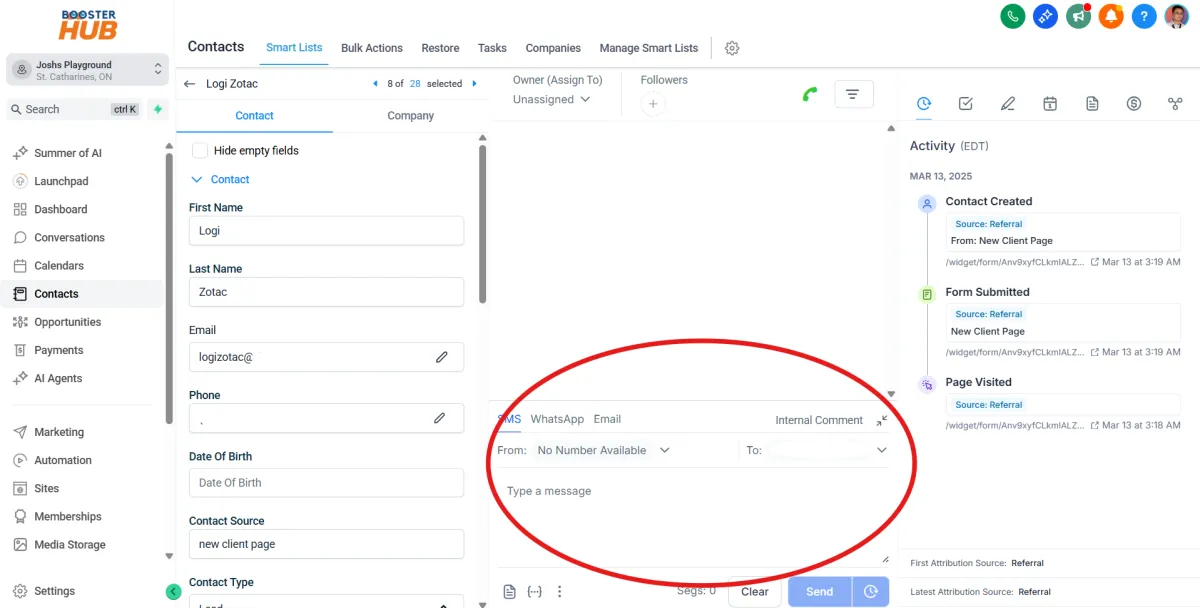
How to Send a Text Message (SMS) to a Contact
Open “Contacts”
From the sidebar, go to Contacts.
Select the Contact
Find and click on the contact’s name.
Click “SMS” tab in the middle panel
Write Your Message
Type your message in the text box.
Optional: use a SMS template from the dropdown.
Click “Send”
How to Send a Bulk Email Campaign
Go to “Marketing” > Emails Tab
Click another campaign Tab
Click New Button
Choose from blank or using templates
Build your email using some elements
Click SEND or SCHEDULE
complete and update the filters
Review and Send

How to Set Up and Use Templates for Emails
To Create a Template:
Go to “Marketing” > Emails Tab
Click Templates Tab
Click New Button and select Blank or Existing Templates
Build Your Email Templates
use some elements then click Save Template